| CPU | RAM | Disk | Network | Uptime | Auth | |||||||
|---|---|---|---|---|---|---|---|---|---|---|---|---|
|
|
NAT
|
|
|
|
|
|
|
!
|
mTLS
Token
|
|
||
|
|
||||||||||||
|
Pending
|
Orphan
|
- | - | - | - | - | - | Awaiting | - |
|
||
Server
Resources
Tunnel & SSH
Agent
SSL
UFW
UFW iptables
Listening Ports
|
|
|
|
|
Disk Usage Overview
/home Directory Usage
| Directory | Size |
|---|---|
| RX (received) | TX (sent) | |
|---|---|---|
|
|
Logs will appear after product installations or operations
System Logs
Real-time logs from all agent services
No logs found
Try adjusting your search or filters
Logs will appear when agent services generate output
Server Behind NAT
Agent Heartbeat Latency
Round-trip time measured by agent during heartbeat
ICMP Ping Latency
Direct ICMP ping to server
TCP Service Response
Fastest responding service port
Monitoring Methods
TCP Ports Checked
The fastest responding port is recorded for each check
Linux Netfilter Packet Flow Click to filter
| # | Chain | Target | Protocol | Source | Destination | To | Packets | Bytes |
|---|---|---|---|---|---|---|---|---|
| # | Chain | ||||||
|---|---|---|---|---|---|---|---|
| - |
UFW Firewall
manages iptablesUFW not available
UFW is inactive
ufw enable to activate it.Default Policies Overview
Filter by Service
| # | To | Action | From | Direction | IPv6 | Comment |
|---|---|---|---|---|---|---|
| v6 - |
| # | To | Action | From | IPv6 | Comment |
|---|---|---|---|---|---|
| v6- |
| # | To | Action | From | IPv6 | Comment |
|---|---|---|---|---|---|
| v6- |
| # | To | Action | From | IPv6 | Comment |
|---|---|---|---|---|---|
| v6- |
Fail2ban not available
Fail2ban is inactive
systemctl start fail2banJails
| Jail Name | Filter | Failed | Total Banned | Currently Banned | Banned IPs | Status |
|---|---|---|---|---|---|---|
|
|
No jails configured
Currently Banned IPs
Configuration
Fail2ban is running on this server but no configuration has been set up in the panel yet. Enable management to configure ban settings, whitelist and blacklist.
Whitelist (Never Ban)
Blacklist (Permanent Ban)
Manual Unban
Unban an IP address from a specific jail
Network Ports
Public Ports (Internet Accessible)
| Port | Protocol | Service | Process (PID) | Risk Level |
|---|---|---|---|---|
| () |
Internal Ports (Localhost Only)
| Port | Protocol | Service | Process (PID) |
|---|---|---|---|
| () |
| Port | Protocol | Interface | Process (PID) | Visibility |
|---|---|---|---|---|
| () |
Network Architecture
Public Zone ( ports)
Internal Zone ( ports)
|
0 | critical high medium | ||
| Spam | IMAP | POP3 | |||||
|---|---|---|---|---|---|---|---|
DKIM
| Type | Name | Required | Current | Status |
|---|---|---|---|---|
| TXT |
_ax2in-verify.
|
|
Add this TXT record to verify domain ownership | ⏳ |
| MX |
|
|
✓ ⚠ ✗ | |
| TXT |
|
|
✓ ⚠ ✗ | |
| TXT |
|
|
✓ ⚠ ✗ | |
| TXT |
|
|
✓ ⚠ ✗ |
SPF
v=spf1 include:your-provider ~all).
DKIM
DMARC
_dmarc.domain.com TXT "v=DMARC1; p=quarantine; rua=mailto:[email protected]".
TLS / STARTTLS
smtpd_tls_security_level = may).
MX Records
MX 10 mail.domain.com).
rDNS / FCrDNS
DNSBL
MTA-STS
_mta-sts.domain.com TXT record and publish a policy at https://mta-sts.domain.com/.well-known/mta-sts.txt.
BIMI
p=quarantine or p=reject, then add a default._bimi.domain.com TXT record.
DANE / TLSA
DKIM
Name:
Type: TXT
Value:
SPF Record
DMARC Record
| Last Login | ||||
|---|---|---|---|---|
|
|
|
| Alias | |||
|---|---|---|---|
|
|
| Alias | Destinations | ||
|---|---|---|---|
No aliases for this mailbox
| IP | Protocol | ||
|---|---|---|---|
Global
| Tag | ||
| Quarantine | ||
| Reject |
DKIM / DMARC / SPF
| 2048-bit | Standard | |
| 3072-bit | High | |
| 4096-bit | Maximum |
v=spf1 mx a ip4:1.2.3.4 -all
v=DMARC1; p=quarantine; rua=mailto:[email protected]
| Policy | |
|---|---|
| p=none | |
| p=quarantine | |
| p=reject |
SSL / TLS
| Standalone | ||
| Webroot | ||
| DNS |
Fail2ban
TXT @ mailadmin-verify-abc123...
| MX | |
| SPF | |
| DKIM | |
| DMARC |
|
|
|
|
:
|
|
|
Never |
|
|
|
|
|
|
|
|
|
||||
BETA
|
|
|||||
|
|
|||||||
|
|
|||||||
Security Audit
Run Lynis security audits on your servers and get AI-powered analysis reports.
No servers found. Add a server to start auditing.
Security Report
Audit History
Firewall Monitor LIVE
Real-time blocked connections from servers
Attack Origins Map
mapped locationsAttack Sources
Top Attackers
| # | IP Address | Country | ISP | Attacked Ports | Target Server | Count |
|---|---|---|---|---|---|---|
|
|
+
|
+
|
Live Feed
Auto-refresh 5sLoading firewall data...
| # | IP | Hostname | Country | ISP | Source | Jail | ||||
|---|---|---|---|---|---|---|---|---|---|---|
| - |
|
|
|
|
|
|
|
Slack
Incoming Webhook
Webhook
Generic HTTP POST + HMAC
SMS
Twilio
Push
Firebase Cloud Messaging
|
|
|
Event Data
Secure Proxy
?
No mesh networks yet
Create your first network to connect servers
Network Topology
Available Servers
Drag to topology to add
All servers are in this network
Peer Details
Network Policies
Control traffic flow between peers in this network
No policies defined
The default policy will apply to all traffic
| Priority | Name | Source | Destination | Protocol | Ports | Action | Status | Actions |
|---|---|---|---|---|---|---|---|---|
|
|
Security Events
No security events
Triggers
No triggers configured
Quarantine
No quarantined peers
All Mesh Policies
Manage traffic policies across all mesh networks
No policies defined
Create policies in individual network settings
| Name | Profile | Status | Resources | Worker | Created | Actions |
|---|---|---|---|---|---|---|
| Agent |
/
/
|
|
No containers yet
Create your first container to get started
Create Container
Create a managed mini-server on a worker host
container_worker: true in agent settings.
Install on Container
Install on a container
After selecting a container, the product will be installed using the standard RunBook system. The container's agent handles installation like a regular server.
| / — |
Base
Core platform for server management and team collaboration.
- Servers
- Team users
- Agent
- Notifications
Extended
Everything in Base plus email, domains, support and automation.
- Everything in Base
- Domains
- Support
- Scheduled Tasks
Enterprise
Full platform with all products, security, mesh networks and more.
- Everything in Extended
- SecureBase
- Monitoring
- Firewall Monitor
- RunBook Products
- Mesh Networks
- Vulnerability Exposure
- HTTP Tunnels
- System Backups
Windows
Linux / Mac
Windows
Linux / Mac
Base
| — | |
| Advanced | — |
| DNS | |
| Admin |
·
|
|
| Domain | |
|---|---|
| IP | |
|---|---|
| IP | ||
|---|---|---|
| CN | |||||||
|---|---|---|---|---|---|---|---|
Vulnerability Exposure
No exposure data yet
To start, go to a server's details page and run a vulnerability scan, or use the server table below after data loads.
Exposure Trend
No trend data yet.
Click to create the first data point, or wait for the automatic daily snapshot.
Severity Distribution
Top Servers by Exposure
Top Cross-Server CVEs
| CVE | Severity | Package | Servers | Fix |
|---|---|---|---|---|
| CVE | Severity | CVSS | Package | Affected Servers | Fix Available |
|---|---|---|---|---|---|
| No | |||||
| No vulnerabilities found | |||||
| CVE | Priority | Status | Package | SLA Due | |
|---|---|---|---|---|---|
| OVERDUE |
|
||||
| No remediation tasks. Click "Auto-Create Tasks" to generate tasks for critical & high CVEs. | |||||
Active Overrides
| CVE | Type | Scope | Justification | Expires | |
|---|---|---|---|---|---|
| AI |
Vulnerability Override
Install Any Software in One Click
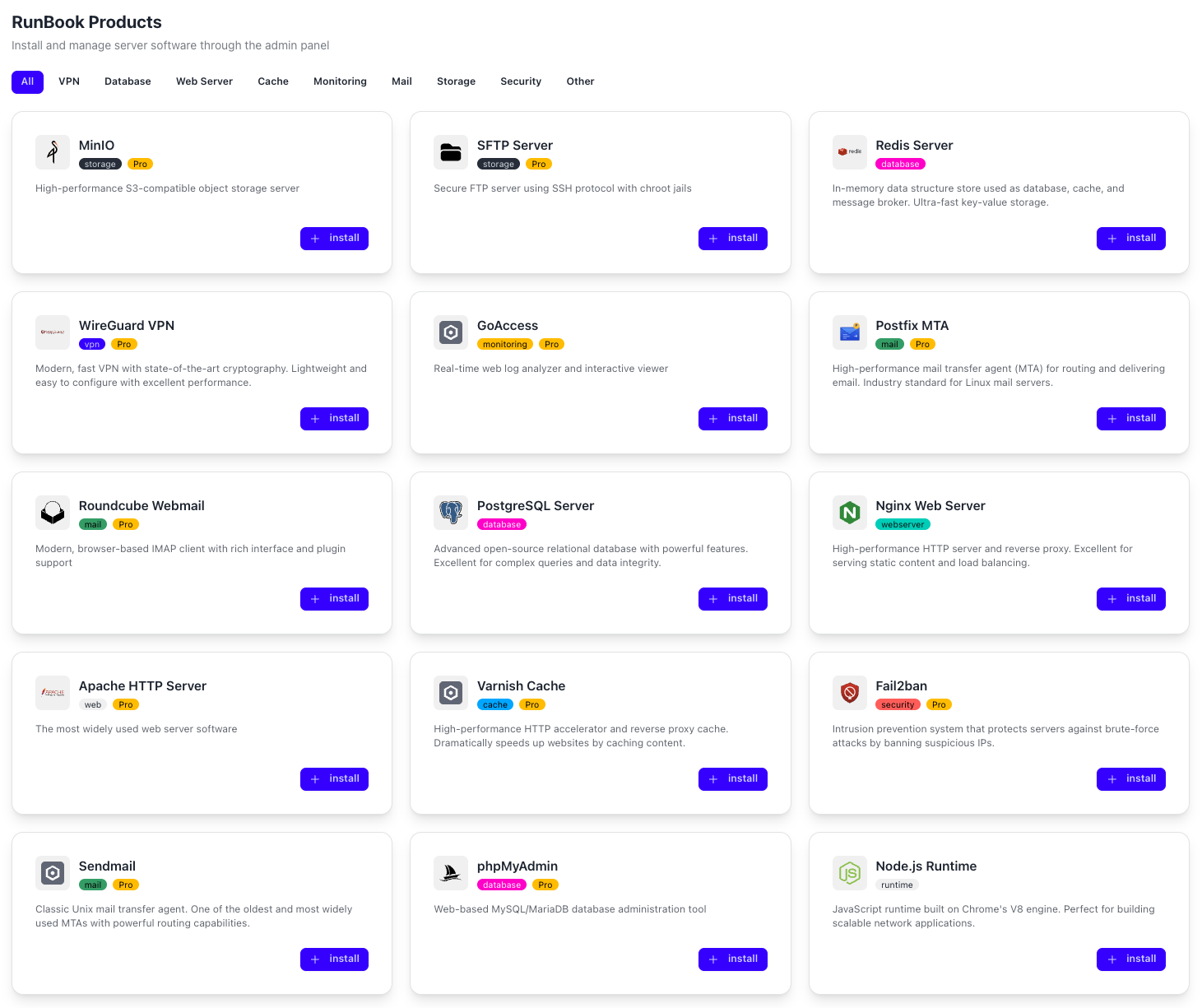
Catalog of 21 ready-to-deploy products. Nginx, PostgreSQL, Docker, WireGuard, Redis, Node.js - install, configure and manage directly from the panel. No SSH, no scripts. Includes resource management (databases, VPN users, vhosts), backups and real-time status.
Private Mesh Networks Between Your Servers
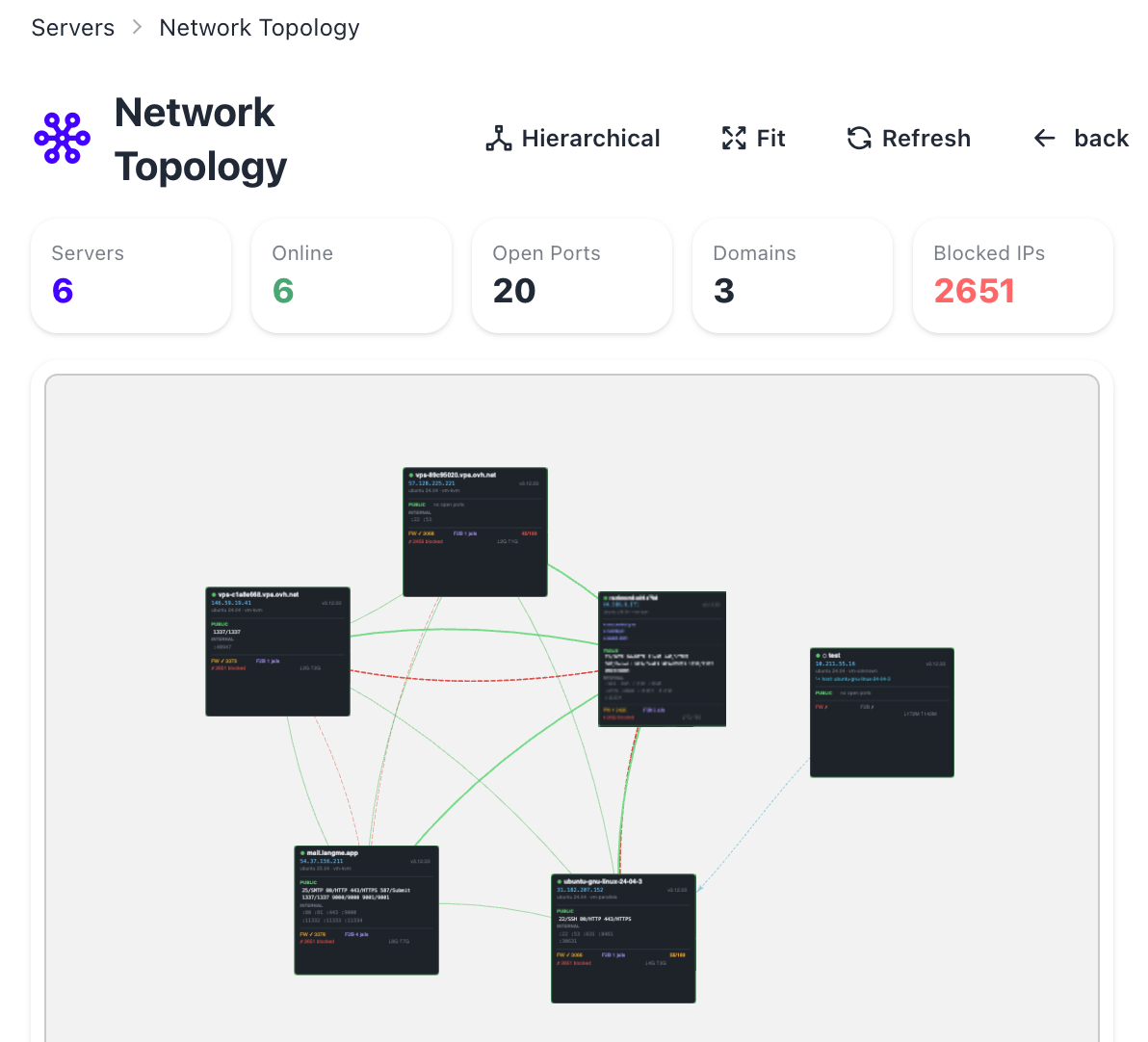
Create encrypted WireGuard networks between servers in seconds. Interactive topology map shows real-time latency, traffic and peer status. Built-in IDS/IPS detects port scans, brute-force attempts and anomalies. Automatic peer quarantine and firewall blocking.
SSH Access Without Opening Ports
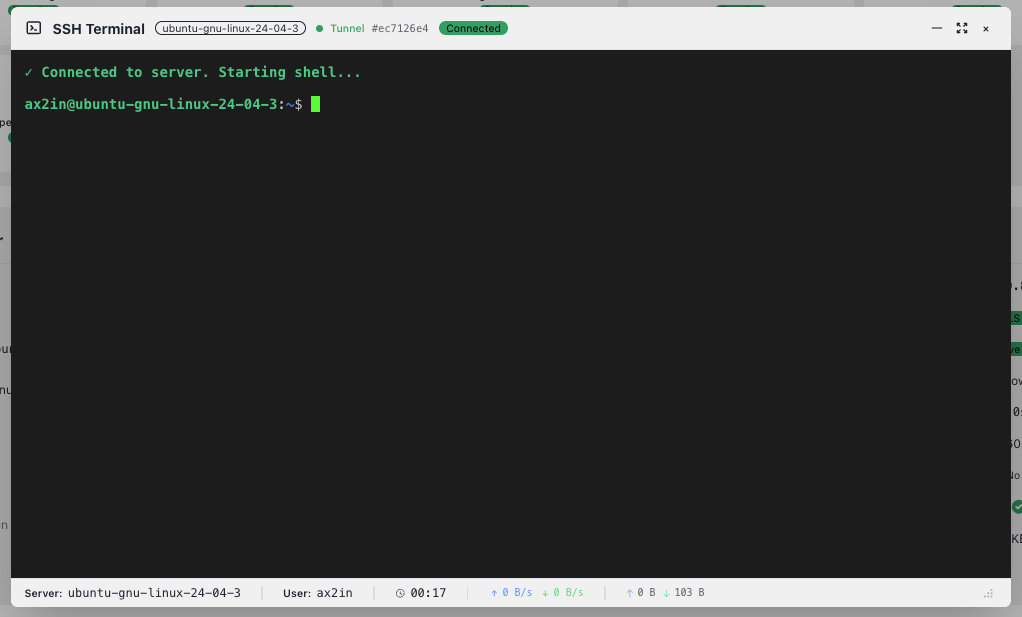
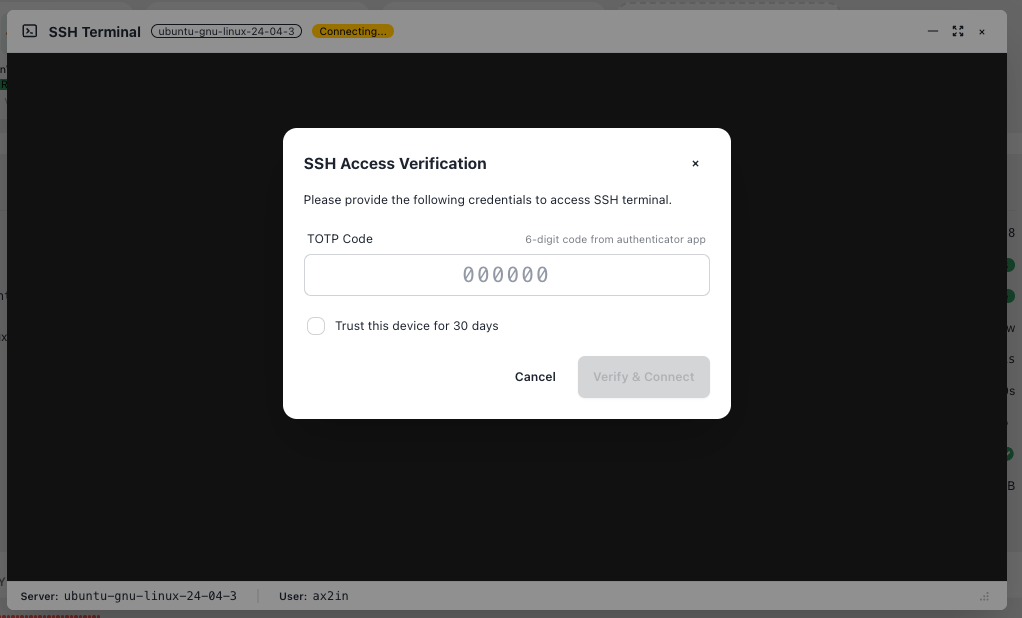
Full terminal in your browser via secure WebSocket tunnel. Works behind NAT - no public IP or firewall rules needed. Protected by TOTP 2FA, trusted devices and session recording. Multiple saved credentials for quick switching.
Finds What You Miss
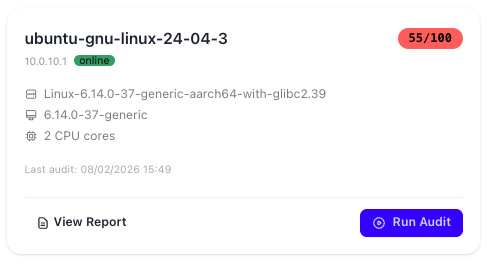
Insight Engine (powered by Claude) analyzes your server configuration, logs and metrics. Generates prioritized security recommendations. Lynis audit gives you a hardening score (0-100) with AI-powered fix suggestions tailored to your specific setup.
See Attacks Hitting Your Servers - Live
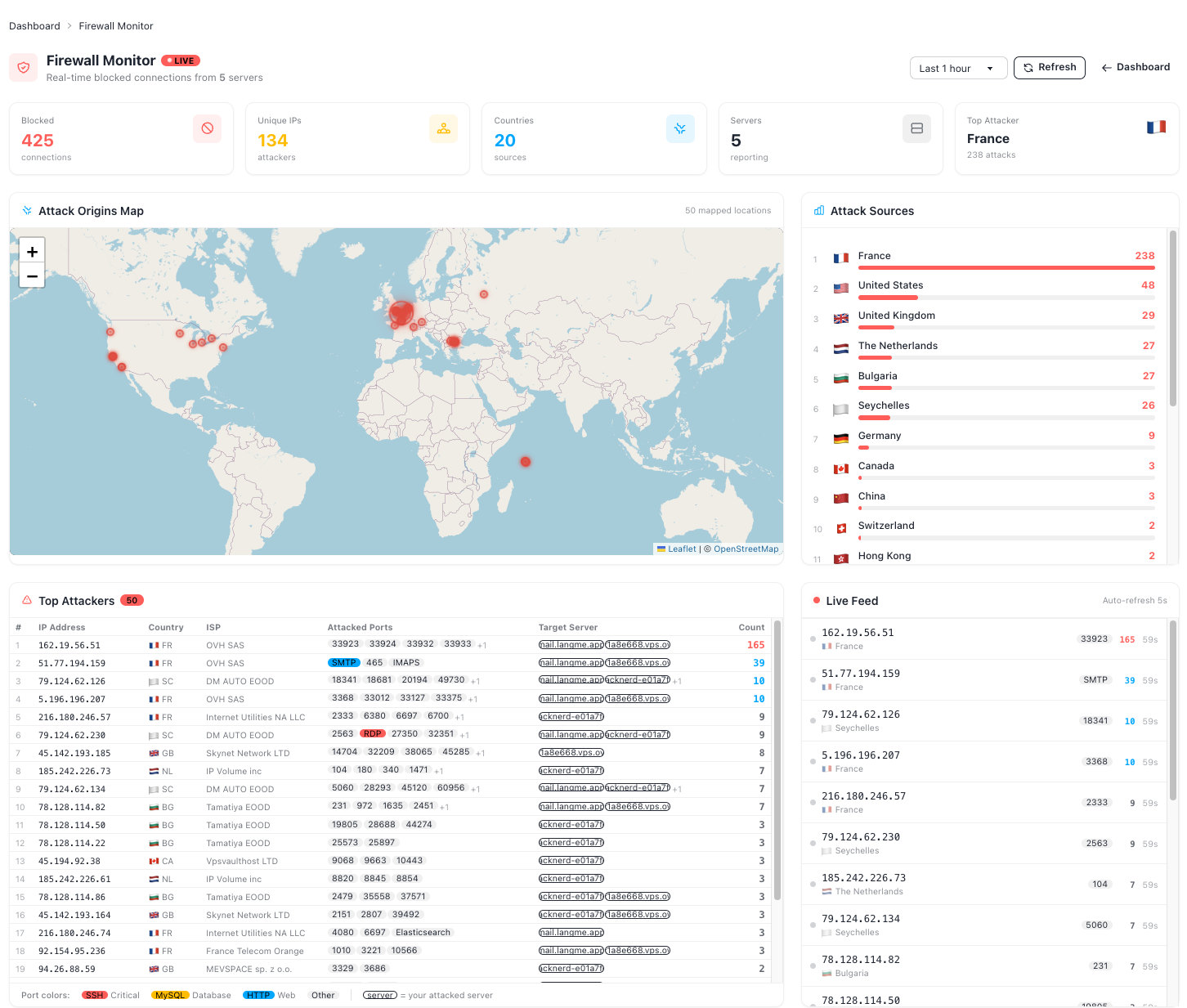
Real-time visualization of blocked connections across all servers. Interactive world map with geolocation, top attackers by IP/country, port color-coding (SSH, MySQL, HTTP, RDP). Live feed refreshes every 5 seconds. Know exactly who's trying to break in.
Domains, Mailboxes, Spam - One Panel
Full email server management: domains with DKIM/SPF/DMARC, mailboxes with quotas, spam quarantine with release/whitelist, IMAP migrations with presets for Gmail, Outlook, cPanel. Real-time queue management and delivery statistics.
Granular Access Control for Your Team
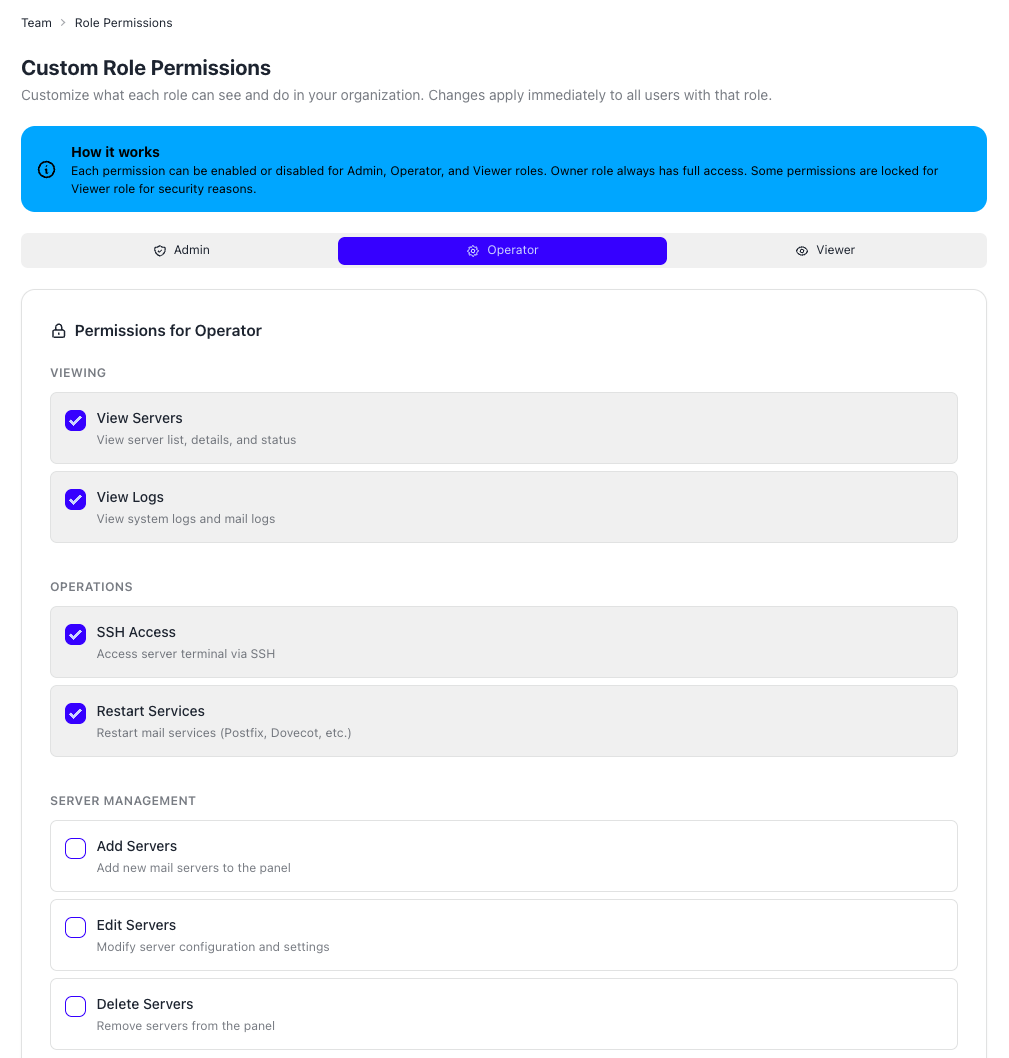
Four roles (Owner, Admin, Operator, Viewer) with fully customizable permissions per category. TOTP 2FA, IP whitelisting, SSH access passwords, RSA-4096 encryption keys with Vault storage. Complete audit log of every action.
Your Panel, Locked Down
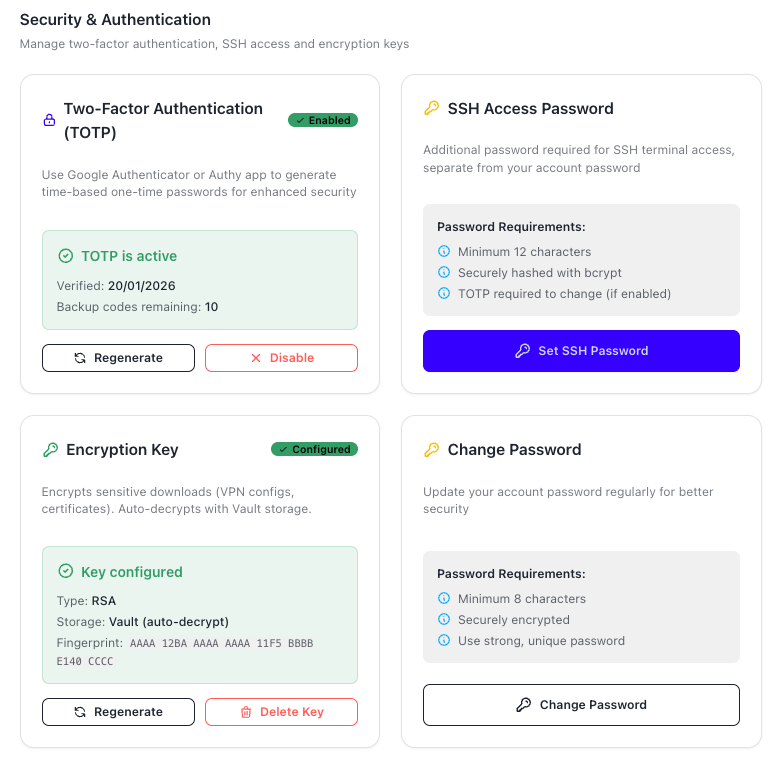
Every layer of the aX2In panel is secured. Two-factor authentication (TOTP) with backup codes, dedicated SSH access passwords hashed with bcrypt, RSA encryption keys stored in HashiCorp Vault, and account password management - all from a single Security & Authentication page.

Managed Mini-Servers in Seconds
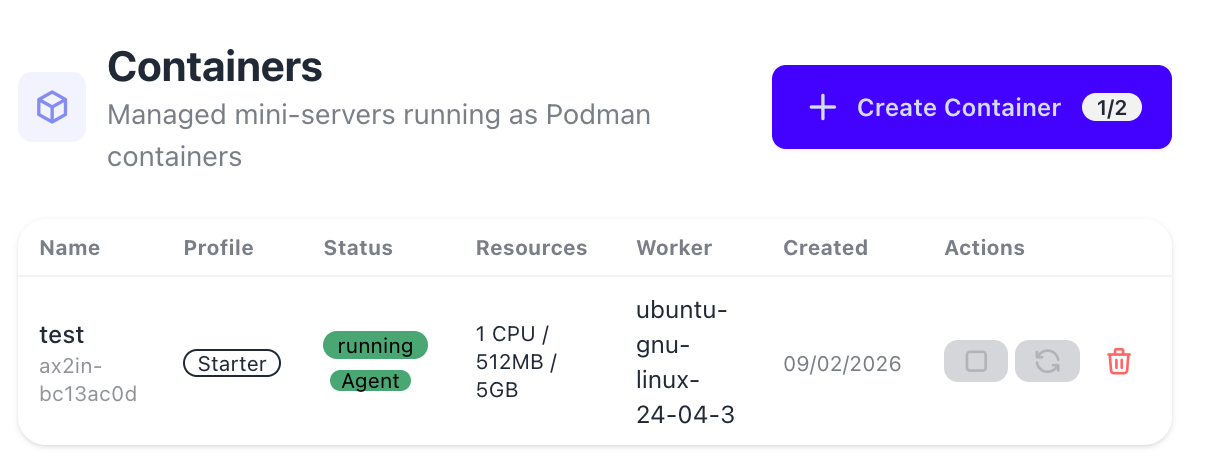
Spin up isolated Podman containers directly from the panel. Each container is a lightweight mini-server with its own resources (CPU, RAM, disk), running on your existing infrastructure. Choose from multiple OS images, manage lifecycle (start, stop, restart, delete) and monitor resource usage — all without touching the command line.
Never Miss a Critical Alert
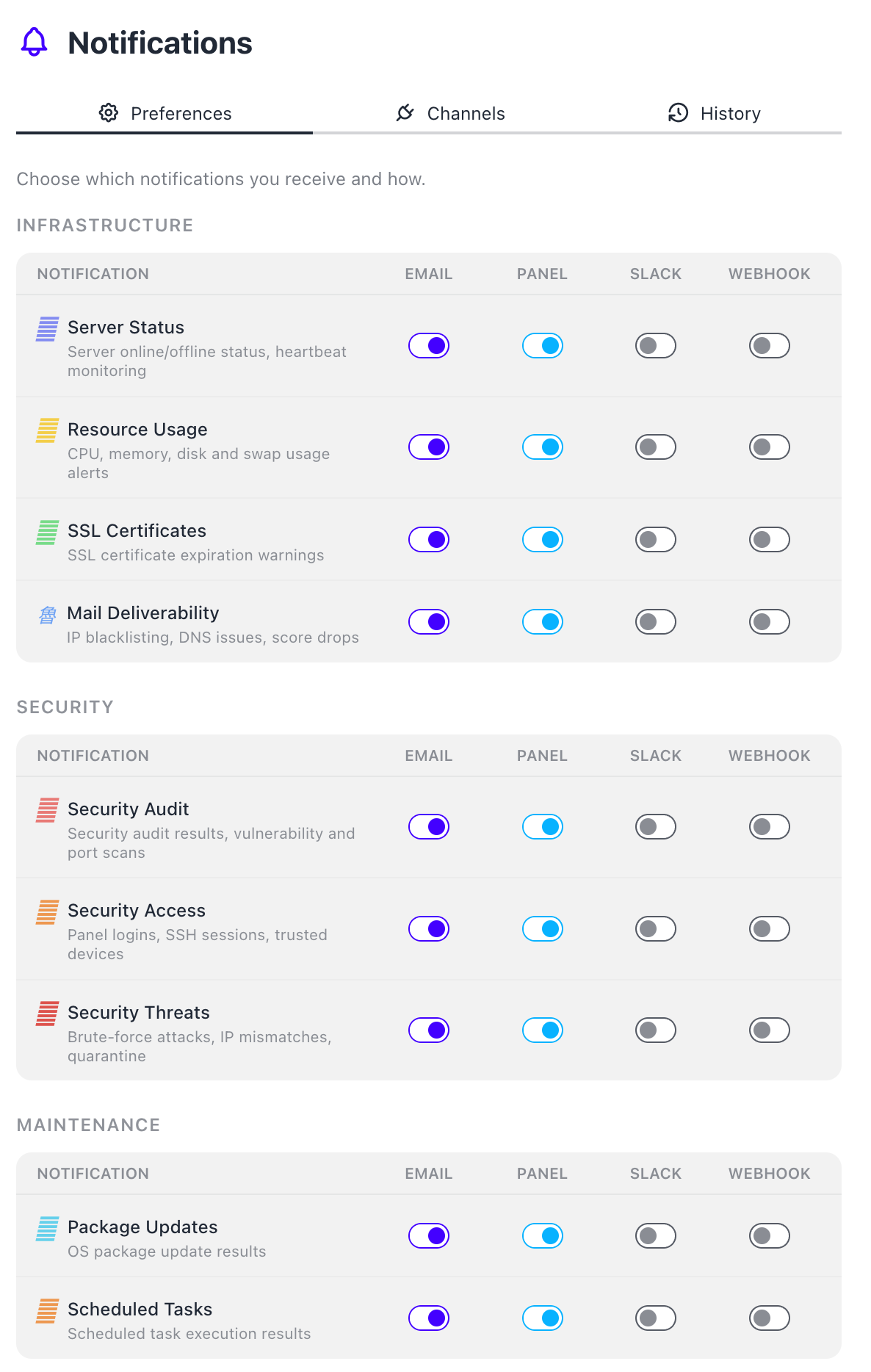
Granular notification preferences across four channels: Email, in-panel, Slack and Webhooks. Organized by category — Infrastructure (server status, resources, SSL, mail deliverability), Security (audits, access, threats) and Maintenance (packages, scheduled tasks). Toggle each combination independently so you get exactly what you need, where you need it.
One Ban Protects All Your Servers
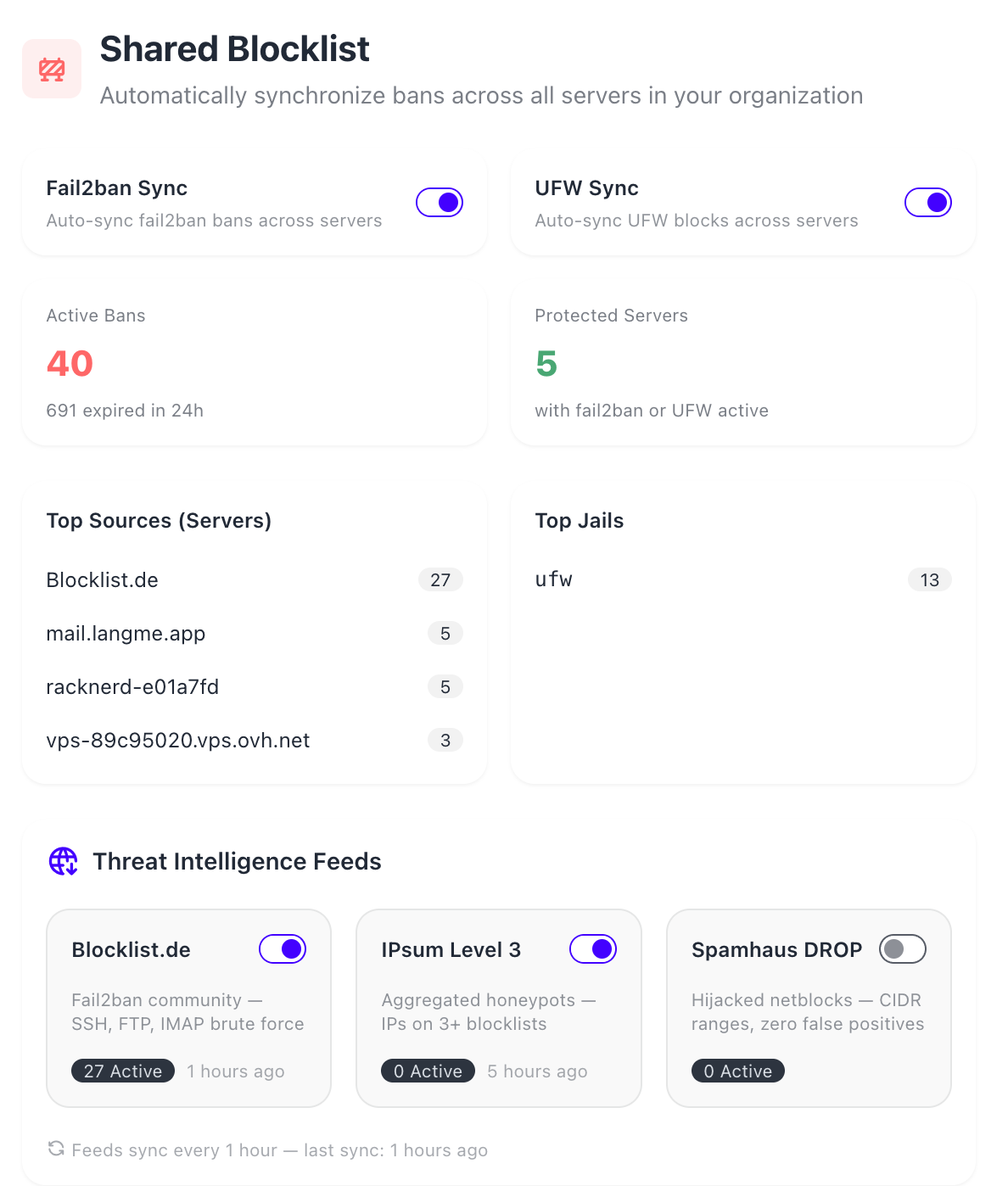
When fail2ban or UFW blocks an IP on one server, the ban automatically propagates to all your servers. Threat Intelligence Feeds (Blocklist.de, IPsum Level 3, Spamhaus DROP) provide proactive protection by blocking known malicious IPs before they even try. Dashboard shows active bans, top sources, top jails and feed sync status.
Set It and Forget It

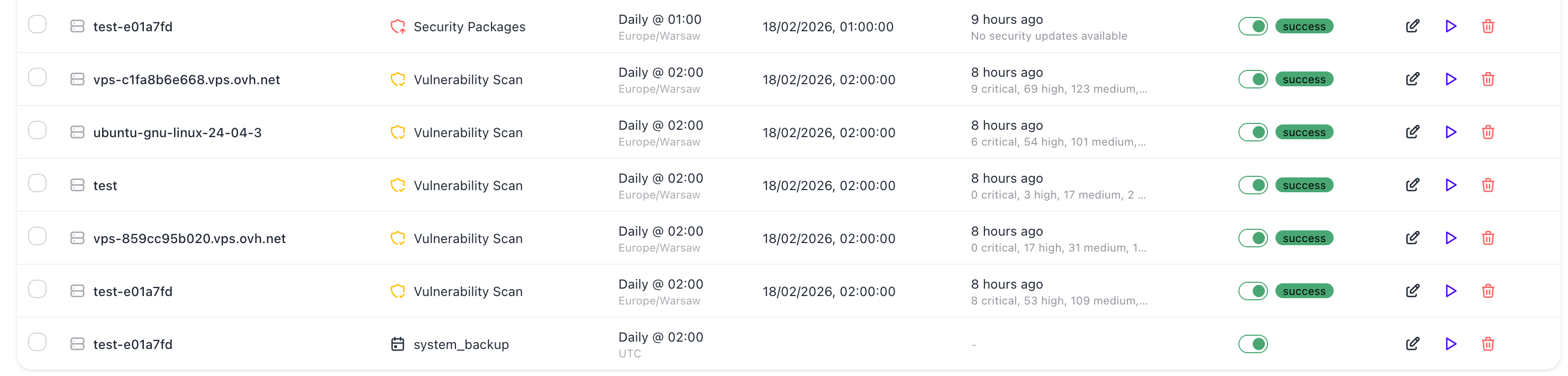
Automate recurring maintenance across all servers. Schedule vulnerability scans, security package updates and full system updates with per-server timing and timezone support. Timeline view shows what's coming in the next 24 hours. Full execution history with status tracking — run manually anytime with one click.
Encrypted Backups to the Cloud
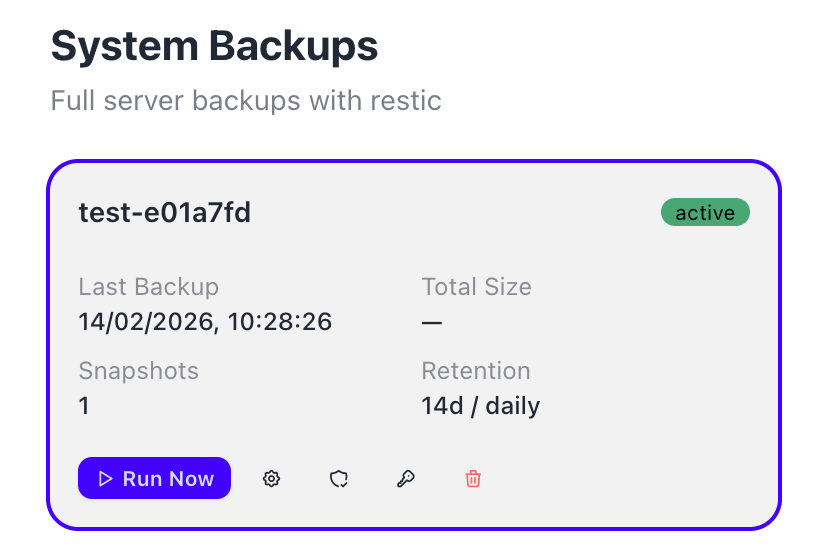
Full server backups powered by restic with Backblaze B2 storage. Auto-detect what to back up (mail config, databases, web server, system files) with smart categories. Configurable retention and scheduling. Browse snapshots, restore individual files or entire systems. All data encrypted at rest — only you hold the password.
Expose Any Service Without Opening Ports
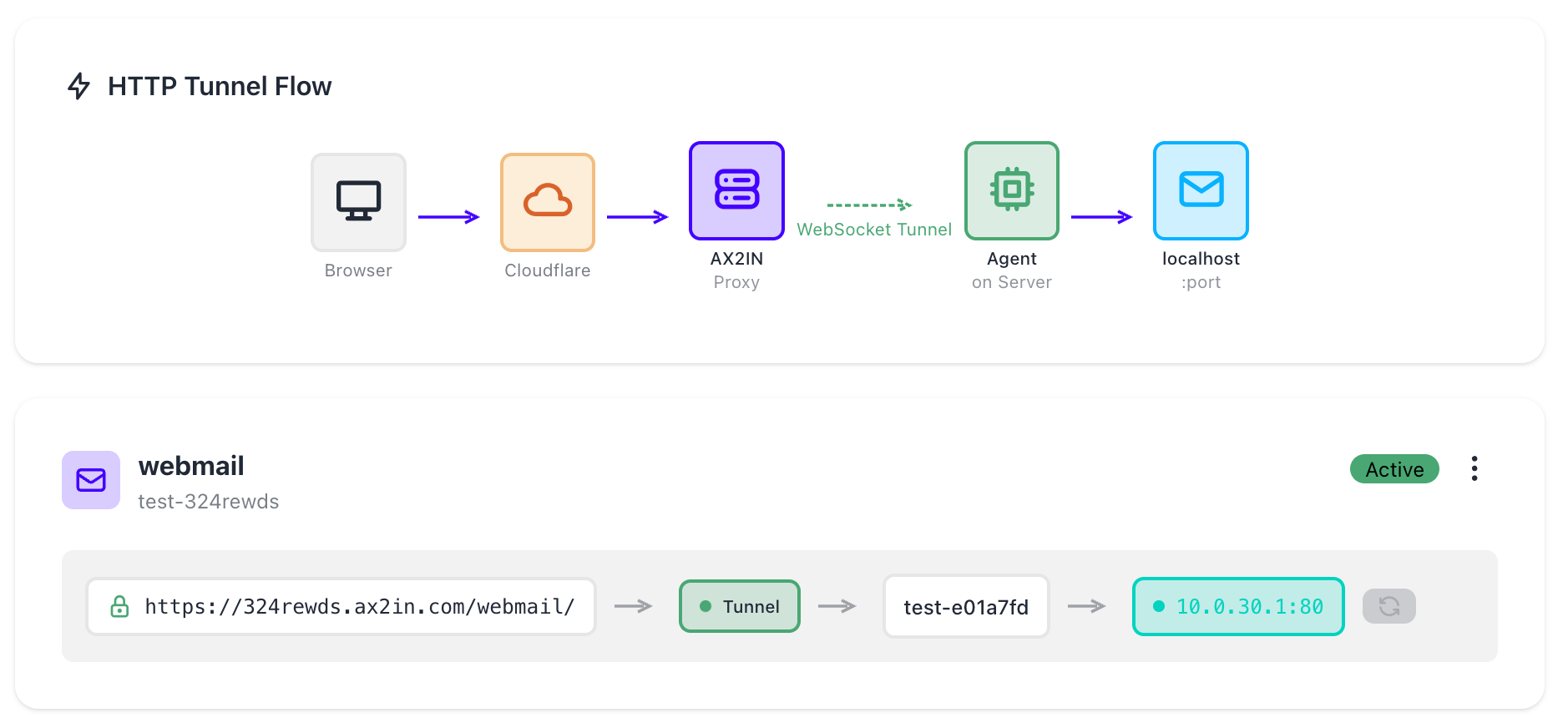
Access any HTTP service on your server through a secure WebSocket tunnel — no public ports, no firewall rules, no VPN. Create a tunnel for webmail, admin panels, databases or any localhost service. Traffic flows through Cloudflare and the aX2In proxy, then through an encrypted WebSocket to the agent on your server. Each tunnel gets a unique HTTPS URL with automatic SSL.
Know If Your Emails Will Land in Inbox
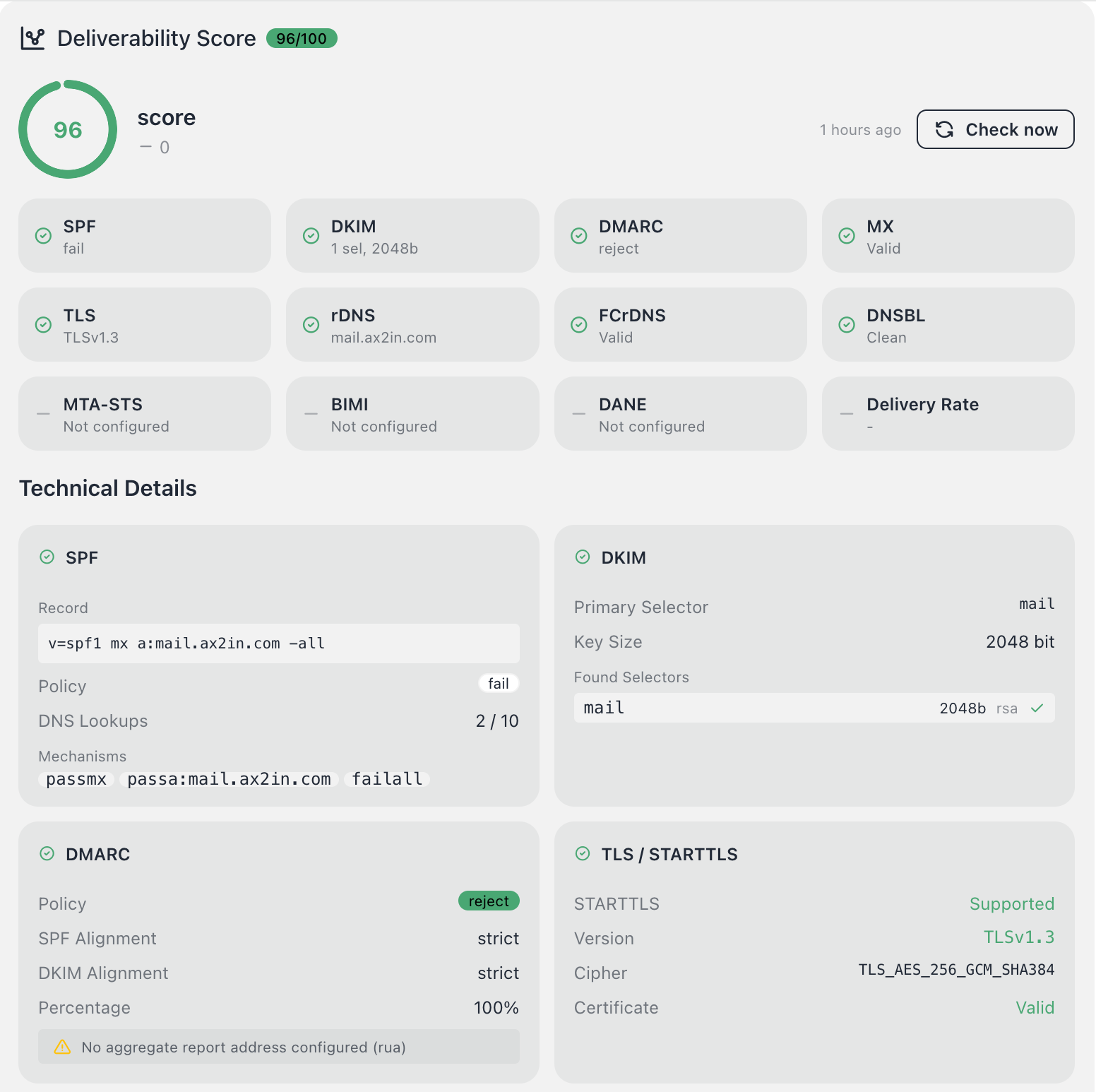
Comprehensive deliverability score (0-100) checking all critical email authentication standards: SPF, DKIM, DMARC, MX, TLS, rDNS, FCrDNS and DNSBL status. Technical details show exact DNS records, key sizes, policy modes and TLS cipher suites. One-click re-check to verify fixes instantly. Know exactly why your emails might be going to spam — and how to fix it.
Find Vulnerabilities Before Attackers Do
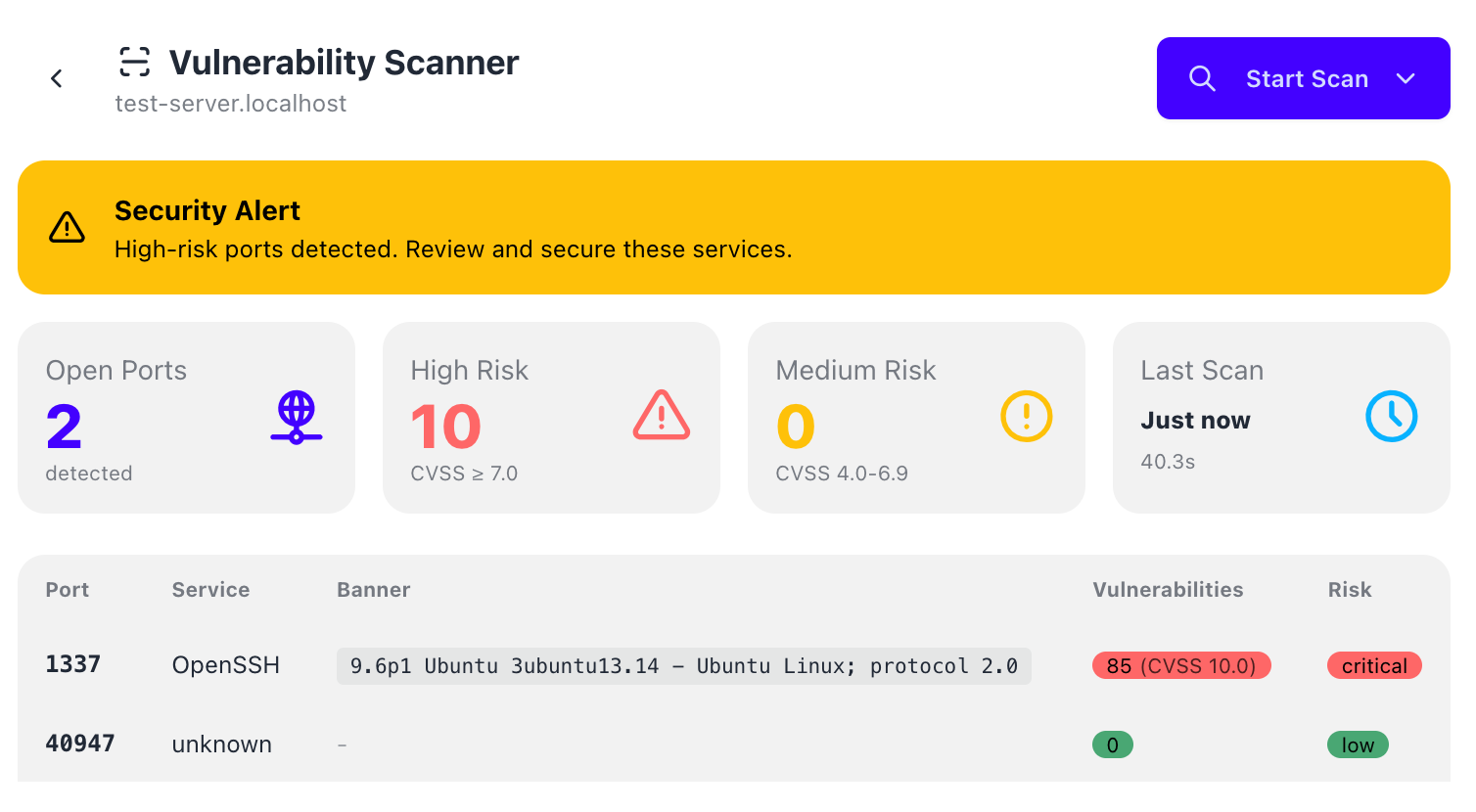
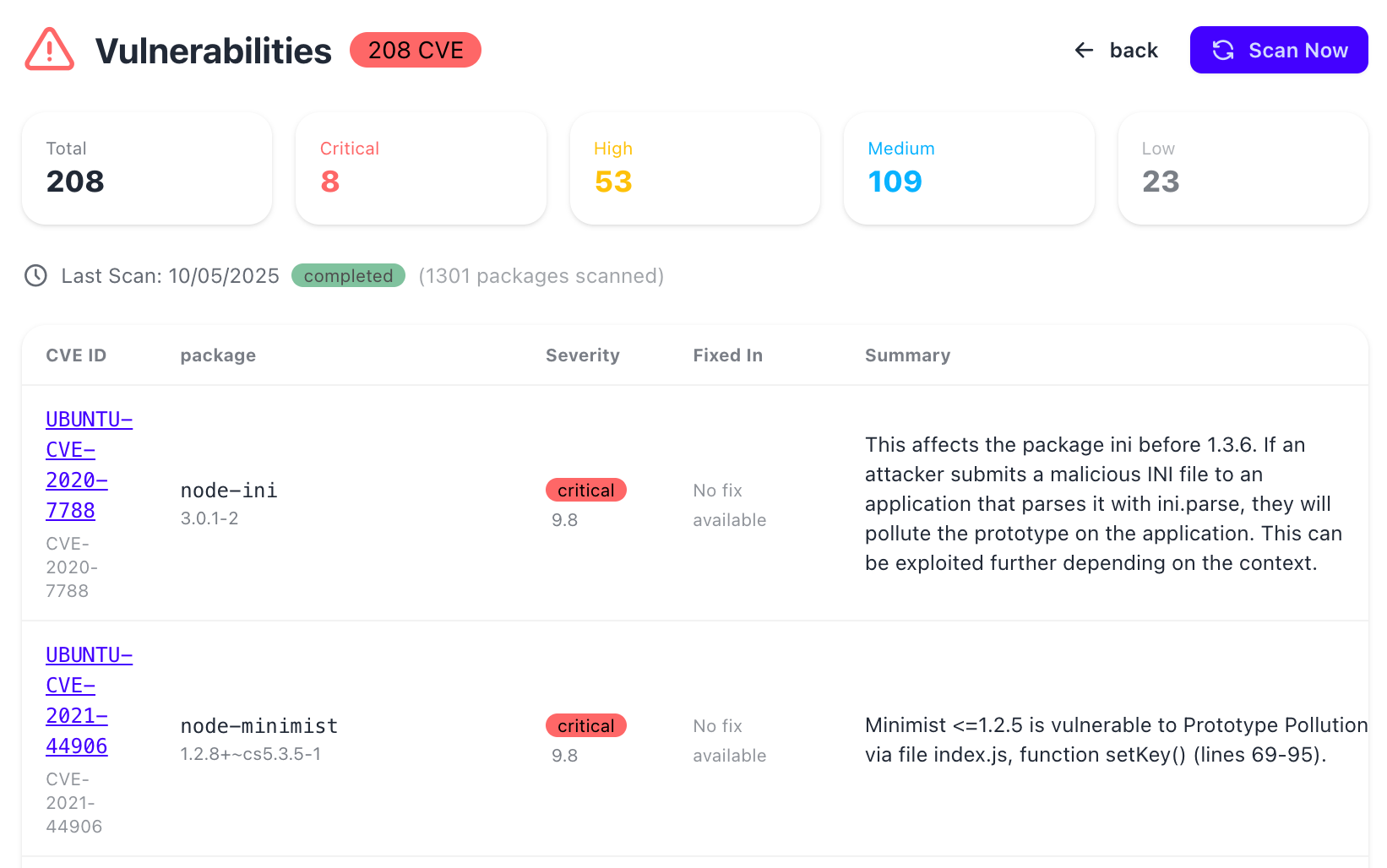
Two-layer vulnerability scanning: Nmap discovers open ports and exposed services with banner detection and risk classification. OSV scanner checks all installed packages against the CVE database — 1300+ packages scanned in seconds. Security alerts highlight high-risk ports, critical CVEs with CVSS scores, and actionable fix recommendations.
No products found
No products in this category. Show all products No products available at this time.
| Name | Type | Status | Created | Actions | |
|---|---|---|---|---|---|
|
|
|

OpenVPN
Secure VPN server with certificate-based authentication
VPN Users
| User | Status | Created | Actions | |
|---|---|---|---|---|
|
|
|
No VPN Users
Create your first VPN user to get started
Connection Info

WireGuard
Fast, modern, secure VPN tunnel
Peers
No Peers
Add your first peer to connect devices
Connection Info

PostgreSQL
Advanced open-source relational database
Databases
| Database | Owner | Status | Created | |
|---|---|---|---|---|
|
|
Database Users
| Username | Privileges | Status | Created | |
|---|---|---|---|---|
|
|
Connection Info

MySQL
Popular open-source relational database
Databases
| Database | Charset | Status | Created | |
|---|---|---|---|---|
|
|
Database Users
| Username | Host | Status | Created | |
|---|---|---|---|---|
|
|
Connection Info

Docker
Container runtime and orchestration
Containers
No containers found
Docker Info
Recent Logs


Apache HTTP Server
The world's most used web server
Server Info

Node.js + PM2
Production process manager for Node.js
PM2 Applications
Runtime Info

Redis
In-memory data structure store
Memory Usage
Server Info
Quick Actions

PHP-FPM
FastCGI Process Manager for PHP
FPM Pools
| Pool Name | Listen | PM Mode | Max Children | Status | |
|---|---|---|---|---|---|
PHP Info
Extensions
Extension info not available

MinIO
High-performance S3-compatible object storage
Buckets
Connection Info
Access Key:

Nginx Proxy Manager
Easy reverse proxy with SSL
Admin Panel
Nginx Proxy Manager provides a web-based admin interface for managing reverse proxies, SSL certificates, and access control.
Port Configuration
Features
- Reverse Proxy
- Free Let's Encrypt SSL
- Access Lists
- Redirection Hosts
main.cf Configuration
| Parameter | Value | |
|---|---|---|
| Parameter | Default Value | Custom? |
|---|---|---|
| custom |
Product not found
Security & Authentication
Manage two-factor authentication, SSH access and encryption keys
Security Setup Required
Two-Factor Authentication (TOTP)
Enabled
Use Google Authenticator or Authy app to generate time-based one-time passwords for enhanced security
Benefits of TOTP:
- Extra layer of protection for SSH access
- Works offline, no internet required
- 10 backup codes for account recovery
Verified:
Backup codes remaining:
SSH Access Password
Enabled
Additional password required for SSH terminal access, separate from your account password
Password Requirements:
- Minimum 12 characters
- Securely hashed with bcrypt
- TOTP required to change (if enabled)
This password will be required when accessing SSH terminals
Encryption Key
Configured
Encrypts sensitive downloads (VPN configs, certificates). Auto-decrypts with Vault storage.
Benefits:
- Secure download of VPN configs
- RSA-4096 encryption
- Vault or local key storage
Type:
Storage:
Fingerprint:
Change Password
Update your account password regularly for better security
Password Requirements:
- Minimum 8 characters
- Securely encrypted
- Use strong, unique password
Active Sessions
Manage your active login sessions across different devices
Current Session:
Security Requirement
At least one security method (TOTP or SSH Password) must be enabled to access SSH terminals. You cannot disable both.